SolutionsProject controls
Project controls software with the baseline still intact
Controllers need the plan, the actual, and the approved change in one place. Sigmaviu stores baseline dates, earned value, schedule variance, and the budget impact of approved changes on the project.
Project controls, cost engineers, and PMO leads.
Controls · earned value
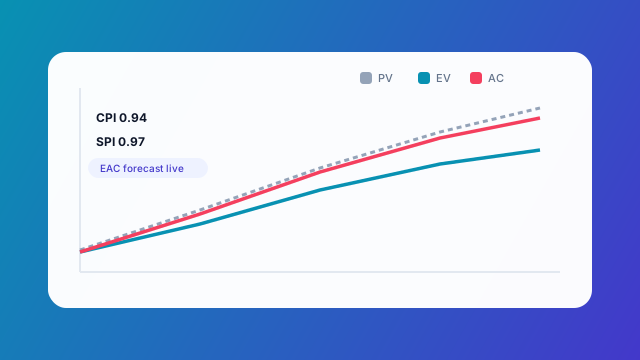
Controls snapshot
Example onlyActual vs baseline · today marked
SPI
0.96
CPI
1.02
EV
$4.2M
AC
$4.1M
What changes
01
Plan versus actual
Baseline dates stay put while current dates move. Variance is visible on the schedule and in portfolio views.
02
Cost that matches the change log
Approved change orders can write budget lines once, with a flag so a second save does not double the cost.
03
Hours you can trace
Role hours on the WBS, resource rates, and approved timesheets can feed billable cost without a second spreadsheet.
04
Decisions become controlled work
From Communications, turn a decision into a task or risk with an audit trail back to the source.
Snapshot
Earned value strip
SPI / CPI style readout for a sample project
| Metric | Value | Band | Note |
|---|---|---|---|
| SPI | 0.96 | Watch | Schedule slightly behind |
| CPI | 1.02 | Healthy | Cost under EV |
| EV | $4.2M | — | Earned to date |
| AC | $4.1M | — | Actual cost |
Distribution
How Sigmaviu handles this
Earned value
SPI, EV, and AC report on the project. CPI is withheld until actual cost exists.
Schedule layers
Show or hide baseline, dependencies, safety markers, and asset markers from a layers control that stays on the Gantt.
Forecast
Mark tasks billable for a lookahead that is separate from invoices already sent.
Risk beside the numbers
Open risks and their approval state sit on the same project the cost report uses.
Service requests on the same project
IT tickets can link or convert into a project so intake and delivery share Delivery context.
A working sequence
1
Baseline the job
Import or enter the plan and keep those dates as the reference.
2
Collect actuals
Progress, timesheets, and recorded cost update the position.
3
Approve change
Push accepted scope into budget and finish date.
4
Report
Read project and portfolio charts from the same records.
Scope
These are project-level controls inside Sigmaviu. They are not a replacement for your corporate cost ledger, a certified cost estimate, or Asana Command for software builders.
Questions buyers ask
Why is CPI blank?
When actual cost is zero, a cost index would be misleading. Sigmaviu shows it as not applicable until cost exists.
Can I re-import a P6 file?
Yes. XER import maps target dates to baseline and actuals to current dates, and a later import can show a diff before you sync.
Do charts drill into the work?
Burndown and variance views link through to the tasks and sprints they summarize.